Forum Discussion

rossshah
Mar 19, 2026Brass Contributor
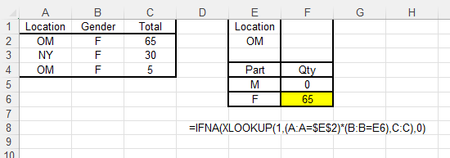
Sumif inside Xlookup
Can someone tell me how to sum within Xlookup please? Correct answer above would have been 65+5=70. I am looking for total qty, if part is "F" and Location is "OM". Main Table has two match...
 Mar 19, 2026
Thank you. Sumproduct did not work but filter function formula above worked. Thanks again.
rossshah
Mar 20, 2026Brass Contributor
Thank you for helping me. All three formulas worked except for the one with additional "." in front.
Following formula is the one that did not work.
=SUMPRODUCT( A2:.A99=$E$2)*(B2:.B99=E6)*(C2:.C99))
But I have three formulas returning the correct value. Thanks again.

m_tarler
Mar 20, 2026Silver Contributor
you're welcome. Somehow I dropped a ( it should be:
=SUMPRODUCT( (A2:.A99=$E$2)*(B2:.B99=E6)*(C2:.C99))
I corrected it in the message below also
- rossshahMar 20, 2026Brass Contributor
It works. Thank you.
- SergeiBaklanMar 21, 2026Diamond Contributor
SUMPRODUCT() definitely works, but SUMIFS() could be bit easier
