Forum Discussion

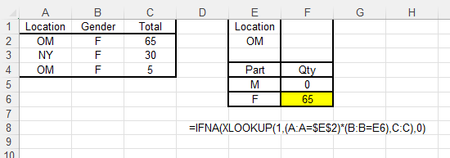
Sumif inside Xlookup
 Mar 19, 2026
Thank you. Sumproduct did not work but filter function formula above worked. Thanks again.

I suggest you just use FILTER or SUMPRODUCT instead. Here are a couple examples that should work:
=SUM(FILTER(C:C, (A:A=$E$2)*(B:B=E6), 0) )
=SUMPRODUCT( (A:A=$E$2)*(B:B=E6)*(C:C) )
Thank you for helping me. All three formulas worked except for the one with additional "." in front.
Following formula is the one that did not work.
=SUMPRODUCT( A2:.A99=$E$2)*(B2:.B99=E6)*(C2:.C99))
But I have three formulas returning the correct value. Thanks again.
- m_tarlerMar 20, 2026Silver Contributor
you're welcome. Somehow I dropped a ( it should be:
=SUMPRODUCT( (A2:.A99=$E$2)*(B2:.B99=E6)*(C2:.C99))
I corrected it in the message below also
- rossshahMar 20, 2026Brass Contributor
It works. Thank you.
- SergeiBaklanMar 21, 2026Diamond Contributor
SUMPRODUCT() definitely works, but SUMIFS() could be bit easier
