Forum Discussion

Sumif inside Xlookup
 Mar 19, 2026
Thank you. Sumproduct did not work but filter function formula above worked. Thanks again.
Thank you. Sumproduct did not work but filter function formula above worked. Thanks again.

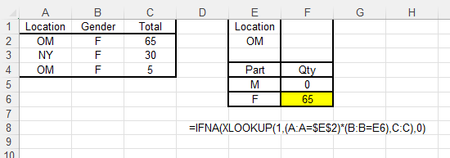
So I just checked and realize the error on the SUMPRODUCT is that the "numeric" range (C:C) has the "Total" line. This would have worked better if it was a Table but making the range actually where the data is would fix it or a simple IFERROR would also correct it:
=SUMPRODUCT((A2:.A99=$E$2)*(B2:.B99=E6)*(C2:.C99))
or
=SUMPRODUCT( IFERROR((A:A=$E$2)*(B:B=E6)*(C:C),0 ))
and honestly you can just use SUM and do both (range where the data is and iferror just in case there is a bad value in the range)
=SUM( IFERROR((A2:.A99=$E$2)*(B2:.B99=E6)*(C2:.C99),0 ))
the use of SUMPRODUCT dates back to before Excel added dynamic arrays and SUMPRODUCT was a way to easily do array calculations without the ctrl-shift-enter.
Either way, I'm glad it is working for you now and how you also learned some more techniques that will be helpful for you as you use Excel. Please mark the appropriate comment that actually provides a solution (you can use the 3 dots to change it as needed)