Forum Discussion

SUMIF Function for a period between two dates
 Nov 22, 2017
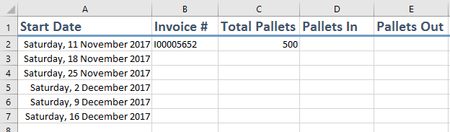
If so, then you have to use the second example which is based on the cell references, then fill down the target weeks and copy the formula down to calculate these weeks.
This shown in the attached file.
Erran,
I have attached the solution for you.
Hope that helps.

Thank you Haytham for your reply.
This solution does work, however it only works for the current week.
Without me editing the formula for each week in the Pallets In column, is there a way for me to auto-populate the required info?
- Haytham AmairahNov 22, 2017Silver Contributor
If so, then you have to use the second example which is based on the cell references, then fill down the target weeks and copy the formula down to calculate these weeks.
This shown in the attached file.
 Enrique García PeñaApr 10, 2018Copper Contributor
Hello, thanks for your answer.
Do you know if I can use SUMIF in D2 at the doc that you uploaded?
I mean the same that you did with SUMIFS but with the rank of week in a single criteria?
Thanks so much for your time
- Haytham AmairahApr 11, 2018Silver Contributor
Hi Enrique,
You can do that, but you have to change the data source by adding a new column contains the week number for each date.
I've used this formula in the data source's new column to get the week number labels:
="Week "&WEEKNUM(A2,16)&" of the year "&YEAR(A2)
After changing the data source, you can use SUMIF function with a single criterion depends on this new column.
Please find the attached file to see that.
Hope that helps
Haytham
- Erran WilliamsNov 23, 2017Copper ContributorOh thank you so much. I apologise for not looking closely enough.
Much appreciated 😁 sandi saputraNov 24, 2017Copper Contributor
I try to make easier for you Erran Williams by modifying data from Haytham Amairah (sorry). I transform ranges to table then change table's name to be "base". the see the formula very easy to be understood.