Forum Discussion

Chris2023
Jun 08, 2023Copper Contributor
Sum With Multiple Arrays
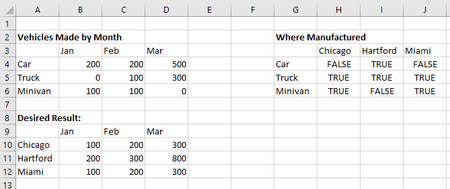
I need to sum a column of data where the combination of two separate criteria are true. In the example below, I need to sum all the vehicles by month based on the city they were manufactured.
 Jun 08, 2023
=TRANSPOSE(MMULT(TRANSPOSE($B$4:$D$6),IF($H$4:$J$6="False",0,1)))You can try this formula. Enter the formula with ctrl+shift+enter if you don't work with Office 365 or Excel 2021.

TheDub
Jun 11, 2023Iron Contributor
Sorry for being late to the game... This is probably not really a formula question as much as trying to understand the logic behind your desired result:
It seems the result is "double dipping", that is - it's giving credit for the same vehicle to more than one city. If you take February, for example - only 400 vehicles were manufactured that month ($C$4:$C$6). On the other hand, your desired result shows 700 vehicles for that month (($C$10:$C$12).
Is that intentional?
It seems the result is "double dipping", that is - it's giving credit for the same vehicle to more than one city. If you take February, for example - only 400 vehicles were manufactured that month ($C$4:$C$6). On the other hand, your desired result shows 700 vehicles for that month (($C$10:$C$12).
Is that intentional?
- Chris2023Jun 12, 2023Copper ContributorHi, that is intentional. The number represents the possible number of people that could need each kind of vehicle. My real life need for the formula isn't about vehicles, but I am a car enthusiast so that is where my brain went. 🙂 Thanks for inquiring.
- TheDubJun 12, 2023Iron ContributorGot it. Thanks for putting my mind at rest!