Forum Discussion

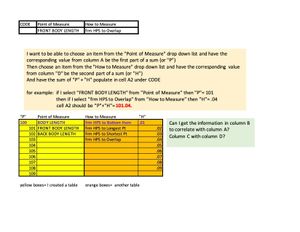
sum of two drop down lists
- May 09, 2023
Yes, that makes all the difference! XLOOKUP is only available in Microsoft 365 and Office 2021, not in Office 2019.
Try this formula instead:
=IF(B13="",0,INDEX(BL[BL'#],MATCH(B13,BL[BL DESCRIPTION],0)))+IF(C13="",0,INDEX(BLHTM[HTM'#],MATCH(C13,BLHTM[HTM DESCRIPTION],0)))
Workbook with this formula attached.

I am not able to select other options in the drop down lists and have them sum correctly/without error.

Which version of Excel do you have?
- feistybMay 09, 2023Copper ContributorOMG! IT WORKED!!!!
Thank you so so much Hans. Really. Thank you for your patience and diligence! - HansVogelaarMay 09, 2023MVP
Yes, that makes all the difference! XLOOKUP is only available in Microsoft 365 and Office 2021, not in Office 2019.
Try this formula instead:
=IF(B13="",0,INDEX(BL[BL'#],MATCH(B13,BL[BL DESCRIPTION],0)))+IF(C13="",0,INDEX(BLHTM[HTM'#],MATCH(C13,BLHTM[HTM DESCRIPTION],0)))
Workbook with this formula attached.
- feistybMay 09, 2023Copper ContributorHi Hans,
I have found out that I have Excel for Mac 2019. Does this change anything? - feistybMay 08, 2023Copper ContributorOK, Thank you for your help.
- HansVogelaarMay 08, 2023MVP
In that case, I don't understand why it doesn't work for you, sorry. The result of the formula changes when I select different items from the drop downs in columns B and C.
- feistybMay 08, 2023Copper ContributorI think its Microsoft 365.
- HansVogelaarMay 08, 2023MVP
And the Office version? Microsoft 365, or Office 2021, or Office 2019, or ...?
- feistybMay 08, 2023Copper ContributorI think I'm using Version 16.66.1? That's what it says in "about excel"