Forum Discussion

Sum of different currecies
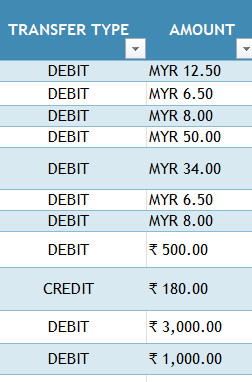

The attached workbook was saved macro-enabled because it contains an XLM command to examine number formats. Instead of using Pivot Tables, I have chosen to use Excel 365 formulas. The first uses the soon-to-be-released PIVOTBY and the second builds the output using SUMIFS.
Things get harder if the 'Currency' column is missing and all one has is number formats showing the Indian Rupee and Malay currency. The GET.CELL(7, ref) is hidden within my GETFORMATλ Lambda function. PIVOTBY works much as before but SUMIFS no longer works because the currency is an array rather than a range reference (using a helper range might have been easier). That formula uses MAP to map headers to give the terms of the table.
p.s. I have assumed debits to be negative when aggregating, but that might not be what was intended.
= PIVOTBY(
    TransferTbl[TRANSFER TYPE],
    MAP(TransferTbl[AMOUNT], GetFormatλ),
    IF(Table1[TRANSFER TYPE]="CREDIT", Table1[AMOUNT], -Table1[AMOUNT]), SUM,,,,0
  )