Forum Discussion

ITTWS
Aug 23, 2023Copper Contributor
Sum last columns with value only
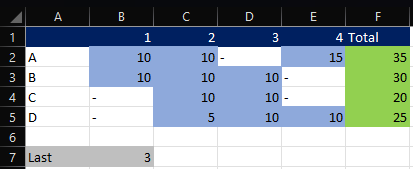
Hi, I would like to make a sum of the last 3 (variable B7) columns with a value per row. The problem is that I want to exclude the rows without the value -. In the example below green is th...
- Aug 23, 2023
ITTWS As anticipated by HansVogelaar here are two possible E365 solutions.
In F2 and copy down:
=SUM(TAKE(FILTER(B2:E2,B2:E2<>"-"),,-$B$7))or one that spills the results in one go:
=BYROW(B2:E5,LAMBDA(a,SUM(TAKE(FILTER(a,a<>"-"),,-B7))))

Riny_van_Eekelen
Aug 23, 2023Platinum Contributor
ITTWS As anticipated by HansVogelaar here are two possible E365 solutions.
In F2 and copy down:
=SUM(TAKE(FILTER(B2:E2,B2:E2<>"-"),,-$B$7))or one that spills the results in one go:
=BYROW(B2:E5,LAMBDA(a,SUM(TAKE(FILTER(a,a<>"-"),,-B7))))
 ITTWSAug 23, 2023Copper Contributor
Thanks. I think the first option would fit me best.
But when i past the formula I get the error below...
- Riny_van_EekelenAug 23, 2023Platinum Contributor
ITTWS Perhaps your Excel set-up requires semi-colons to separate the arguments.
- HansVogelaarAug 23, 2023MVP
If you use comma as decimal separator, replace all commas in the formula with semicolons ;
