Forum Discussion

ITTWS
Aug 23, 2023Copper Contributor
Sum last columns with value only
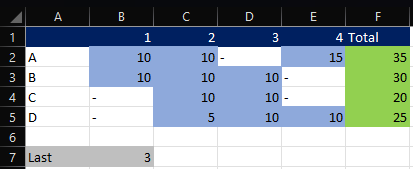
Hi, I would like to make a sum of the last 3 (variable B7) columns with a value per row. The problem is that I want to exclude the rows without the value -. In the example below green is th...
- Aug 23, 2023
ITTWS As anticipated by HansVogelaar here are two possible E365 solutions.
In F2 and copy down:
=SUM(TAKE(FILTER(B2:E2,B2:E2<>"-"),,-$B$7))or one that spills the results in one go:
=BYROW(B2:E5,LAMBDA(a,SUM(TAKE(FILTER(a,a<>"-"),,-B7))))


HansVogelaar
Aug 23, 2023MVP
Others will undoubtedly come up with a clever formula using Excel 365-only functions.
Here is a custom VBA function:
Function SumLast3(rng As Range, n As Long) As Double
    Dim i As Long
    Dim m As Long
    Dim s As Double
    For i = rng.Count To 1 Step -1
        If IsNumeric(rng(i).Value) Then
            s = s + rng(i).Value
            m = m + 1
            If m = 3 Then Exit For
        End If
    Next i
    SumLast3 = s
End Function
Use like this in F2:
=SumLast3(B2:E2,$B$7)Fill down.
(Added: a better name for the function would have been SumLastN)