Forum Discussion

Michel_Verschueren
Feb 10, 2022Copper Contributor
SUM function returns wrong result
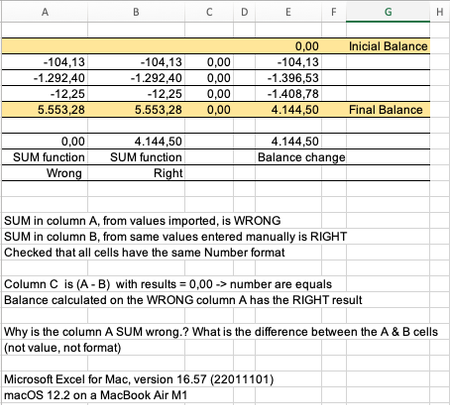
See below: SUM in column A, from imported values, is WRONG SUM in column B, from same values entered manually is RIGHT Checked that all cells have the same Number format Column C is (A - B) wi...

Riny_van_Eekelen
Feb 10, 2022Platinum Contributor
Michel_Verschueren I suspect that the imported values in column A are in fact texts. That's why SUM returns zero.
 Michel_VerschuerenFeb 10, 2022Copper ContributorHi, thanks but I checked that all values are numbers. Also these values are used by the balance column (E) and seen as numbers that return the correct final balance. Also my original spreadsheet is bigger, where the wrong SUM in column A is not zero but still wrong. NB: Is it possible to join my Excel file to this discussion (I'm a first timer)?
- SergeiBaklanFeb 10, 2022Diamond Contributor
As a comment, in column E you have correct result since you don't use SUM() here. Text which represent numbers are converted to numbers in arithmetic operations and ignored in SUM()
- Michel_VerschuerenFeb 10, 2022Copper ContributorThanks all. Interesting point Serguei. I didn't knew that. I saw that the values where in text format and I have set all as numbers. Even so, some of them are still seen as text by the SUM function. It can be seen in the complete spreadsheet. I will share it later.
- Detlef_LewinFeb 10, 2022Silver ContributorYou can check the cell with ISNUMBER() or ISTEXT() to find out what's the data type.
- Michel_VerschuerenFeb 10, 2022Copper ContributorHi Detlef, thanks for the suggestion. The ISNUMBER() returns FALSE for the values but the Format Cells shows them as: Number with 2 decimal places and (.) separator. However, if I remove this separator, it now shows as TRUE after making enter on the value. Then, if you put back the (.) separator it continues to show TRUE. So, the problem is solved, but it seems a bug and we should remember this when doing conversion of values from Text to Number.
- Riny_van_EekelenFeb 10, 2022Platinum Contributor
Michel_Verschueren You could share it via OnDrive, Dropbox or something simmilar and include a link or send it to me in a Direct Message.

