Forum Discussion

fhceq
Jan 24, 2022Copper Contributor
Sum by group excel (non-vba nor power query)
Please, I want to sum by group, however I have some conditions. For exemple: I have different fruits divided in groups (1 to 5) in Table 1. In Table 2, I have the quantity of some fruits that are...
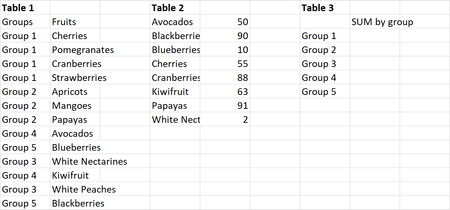
 Jan 24, 2022
Another variation I think will work:
=SUM((Table1[Groups]=[@Group])*(Table1[Fruits]=TRANSPOSE(Table2[Fruit]))*TRANSPOSE(Table2[Qty]))

PeterBartholomew1
Jan 24, 2022Silver Contributor
I think the most straightforward approach is to introduce a helper column to Table 1 to bring the quantities across from Table 2.
= XLOOKUP(
    [@Fruits],
    Table2[Fruits],
    Table2[Quantity],
  0)
That leave a simple SUMIFS to obtain the result
= SUMIFS(
    Table1[Quantity],
    Table1[Groups],
    groups#)
where 'groups#' is a unique list of the distinct groups.
Naturally, I also set out to achieve the result with a single formula. The trouble is that SUMIFS expects the 'quantities to be summed' to be a range reference and not an array. To, instead, work cell by cell using MAP, one could have
= LET(
    grouping, Table1[Groups],
    quantity, XLOOKUP(Table1[Fruits],Table2[Fruits],Table2[Quantity],0),
    SumIfsλ,  LAMBDA(qty,defGrp,
      LAMBDA(grp,
        SUM(FILTER(qty,defGrp=grp)))),
    MAP(groups#,
      SumIfsλ(quantity,grouping)
    )
  )

fhceq
Jan 26, 2022Copper Contributor
PeterBartholomew1, thank you so much!