Forum Discussion

fhceq
Jan 24, 2022Copper Contributor
Sum by group excel (non-vba nor power query)
Please, I want to sum by group, however I have some conditions. For exemple: I have different fruits divided in groups (1 to 5) in Table 1. In Table 2, I have the quantity of some fruits that are...
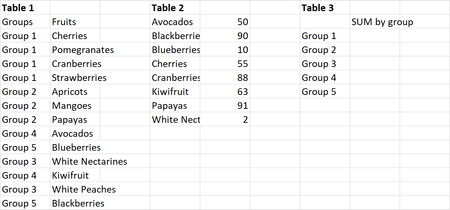
 Jan 24, 2022
Another variation I think will work:
=SUM((Table1[Groups]=[@Group])*(Table1[Fruits]=TRANSPOSE(Table2[Fruit]))*TRANSPOSE(Table2[Qty]))

SergeiBaklan
Jan 24, 2022Diamond Contributor
As variant
with
=LET(
  groups, UNIQUE(Table1[Group]),
  qty, MMULT( --(groups=TRANSPOSE(Table1[Group]) ), XLOOKUP(Table1[Fruits],Table2[Fruit],Table2[Qty], 0) ),
  IF( {1,0}, groups, qty) )
fhceq
Jan 25, 2022Copper Contributor
SergeiBaklan, thank you so much!
I had never used "LET" and "UNIQUE" functions until now, and your solution helped me to know they exist, and I could learn a bit more about them, specially because they were applied in a situation I was dealing to.
Thank you!
I had never used "LET" and "UNIQUE" functions until now, and your solution helped me to know they exist, and I could learn a bit more about them, specially because they were applied in a situation I was dealing to.
Thank you!
- SergeiBaklanJan 25, 2022Diamond Contributor
You are welcome. I'd recommend to start from any of such function page, e.g. FILTER function (microsoft.com) and check all references