Forum Discussion

hrh_dash
Aug 02, 2022Iron Contributor
Subtraction macro showing an error run time error 1004 application-defined object-defined
How do I resolve the subtraction code below as it is showing an error message: "error run time error 1004 application-defined object-defined" Sub subract()
Dim ws As Worksheet...

HansVogelaar
Aug 02, 2022MVP
In the line
ws.Range("G2:G" & lastRowK).NumberFormat = "#,##0.00"you use lastRowK instead of wsLastrow.
Since lastRowK has not been assigned a value, it is 0, which is not a valid row number.
If you had required all variables to be declared explicitly, you would have been notified of this.
 hrh_dashAug 02, 2022Iron Contributor
Hi HansVogelaar , after correcting it to
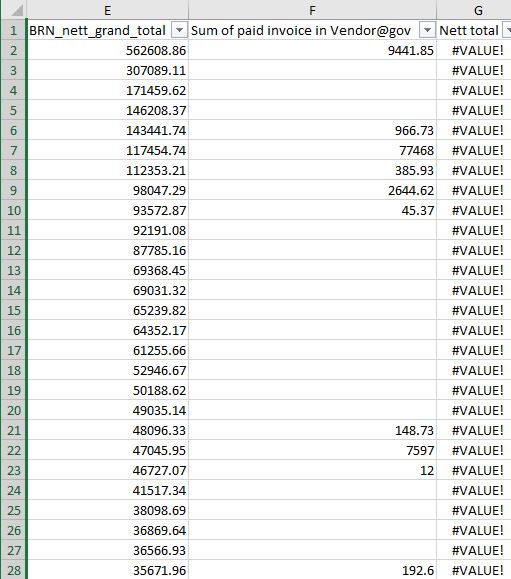
ws.Range("G2:G" & wsLastrow).NumberFormat = "#,##0.00", my results are populated as #value.Tried using this code below for a separate workbook, it does work.
ws.Range("G2:G" & wsLastrow) = Evaluate("E2:E" & wsLastrow & "-F2:F" & wsLastrow)
not sure why it is populating #value now for this workbook, is it due to blank cells in row F?
- HansVogelaarAug 02, 2022MVP
That's impossible to know without seeing the workbook
- hrh_dashAug 02, 2022Iron ContributorApologies for the false alarm, I managed to rectify the issue by placing the macro into a module. Managed to get the code working nicely.