Forum Discussion

Badoumba
Jan 21, 2024Copper Contributor
Structured Tables, Names and dynamic list
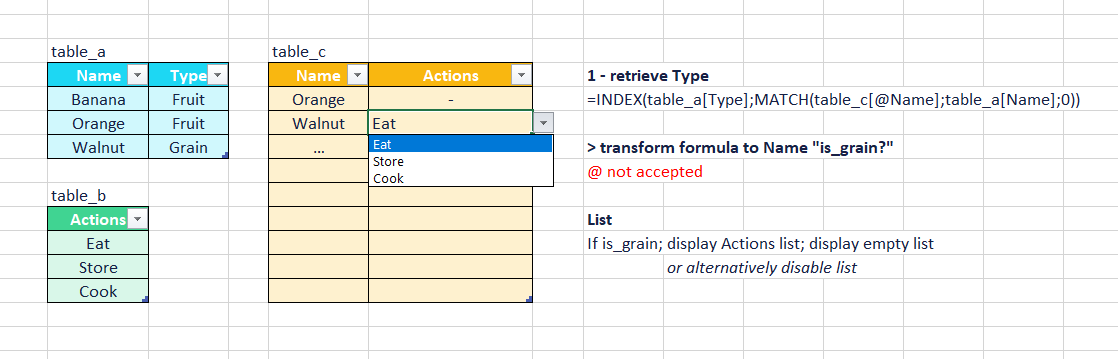
Hi everyone, New to Excel I try to achieve the following: Table_c Depending on the name selected ([Name]), I'd like to list possible actions ([Actions]) from table_b only for the type Grain (t...

Badoumba
Jan 21, 2024Copper Contributor
Hi djclements
Yes, perfectly! A big thank you for the tip!.
Just for the sake of understanding, can $D3 be replaced by a name also? I tried with lstName_c (=table_c[Name]) but it is not working.
Yes, perfectly! A big thank you for the tip!.
Just for the sake of understanding, can $D3 be replaced by a name also? I tried with lstName_c (=table_c[Name]) but it is not working.

djclements
Jan 21, 2024Silver Contributor
Badoumba Include the "@" symbol to indicate "This Row". Also, be sure to include the table name in the reference. For example, lstName_c: =table_c[@Name].
Having said that, the whole thing can be simplified by defining a name called lstActions with the following formula:
=INDIRECT(INDEX(table_a[Type]; MATCH(table_c[@Name]; table_a[Name]; 0)))
Then just use =lstActions as the Data Validation list source (see attached). Cheers!