Forum Discussion

Structured Table References: Multiple non-contiguous columns?
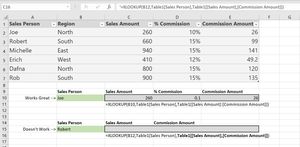

If you use titles for the result, that could be
=INDEX(XLOOKUP($B15,Table1[Sales Person],Table1),,XMATCH($C14:$D14,Table1[#Headers],0))Just be sure titles here are exactly the same as table headers (I corrected by copy/paste)

SergeiBaklan Wow! Definitely a creative approach; I never would have thought to use XLOOKUP as a way to return an array to use with the INDEX function.
Even though that accomplishes exactly what I was looking for, it still seems far more complex than it should be (I say this, of course, in total ignorance of what it would take to develop what I'm imagining).
I suppose I'm just curious why I *can't* simply give a list of header names in the structured reference, such as:
=XLOOKUP(B15,Table1[Sales Person],Table1[ [Sales Amount] , [Commission Amount] ])
Should this be a feature request? It seems like it'd be a flexible, powerful, and intuitive feature
- SergeiBaklanFeb 14, 2020Diamond Contributor
You may vote for this idea here XLOOKUP to return an array of ranges
 David_pdxOct 26, 2020Copper Contributor
SergeiBaklan In this case it doesn't need to be an array of ranges. It could just be a list or array indicating what columns from the array it wants returned. For example, taking something like {1,0,1,1,0,1} as another argument would specify that you want the 1st, 3rd, 4th, 6th col
- SergeiBaklanOct 27, 2020Diamond Contributor
Sorry, I didn't catch. For array as {1,0,1,1,0,1} FILTER returns columns marked in it as TRUE. In previous formula INDEX returns columns which numbers returned in array by XMATCH. But XLOOKUP doesn't return array of ranges. Did I miss something?