Forum Discussion

String Match part of an array with repeated strings in duplicate records and return value
 Jul 11, 2022
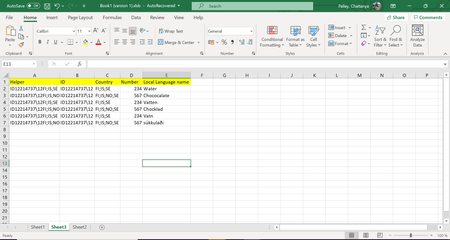
=IF(SUM(N(IF((sheet3!$B$2:$B$7=sheet4!H7)*ISNUMBER(SEARCH(sheet4!G7,sheet3!$C$2:$C$7))=1,MATCH(IF((sheet3!$B$2:$B$7=sheet4!H7)*ISNUMBER(SEARCH(sheet4!G7,sheet3!$C$2:$C$7))=1,sheet3!$D$2:$D$7),IF((sheet3!$B$2:$B$7=sheet4!H7)*ISNUMBER(SEARCH(sheet4!G7,sheet3!$C$2:$C$7))=1,sheet3!$D$2:$D$7),0)=ROW($1:$6))))>1,"Multiple",INDEX(sheet3!D$2:D$7,MATCH(1,(sheet3!$B$2:$B$7=sheet4!H7)*ISNUMBER(SEARCH(sheet4!G7,sheet3!$C$2:$C$7)),0)))
This formula seems to work in my sheet. The formula has to be entered with ctrl+shift+enter if one doesn't work with Office365 or 2021. Do you happen to work with Office365 or 2021? I think with the help of the UNIQUE and FILTER formula it would be a lot easier to do this.
=IFERROR(INDEX(sheet3!D$2:D$7,SMALL(IF((sheet3!$B$2:$B$7=sheet2!$G$5)*ISNUMBER(SEARCH(sheet2!$F$5,sheet3!$C$2:$C$7)),ROW(sheet3!$D$2:$D$7)-1),ROW(sheet2!1:1))),"")Does this formula return your expected result? Enter the formula with ctrl+shift+enter if you don't work with Office365 or 2021.
- Chaitanya_PalleyJul 11, 2022Copper Contributor
Hi OliverScheurich , thanks for the response. I used your formula, it still seems to work the same way as vlookup. It is bringing the first instance value when I select "FI". The formula should some way find that "FI" is more than once uniquely and let us to return "Multiple" as there are more than one number values for country "FI"(234 and 567).
- OliverScheurichJul 11, 2022Gold Contributor
I assume that the formula is only entered in cell H4. You can drag the formula down to cell H10 and across the range H4:I10. In my sample sheet you can see that the formula returns all values for number and local language according to the country code and the ID.
- Chaitanya_PalleyJul 11, 2022Copper Contributor
OliverScheurich, Yes I only had the formula in one cell. However, even if I drag it is bringing me all the values into other cells where "FI" exists in the string. But what I am looking for is that in the same cells the formula should understand that there multiple values for that country and throw error which we can customize it to multiple. Is there a way I can use your formula and count the results in the background and do what I am looking for?