Forum Discussion

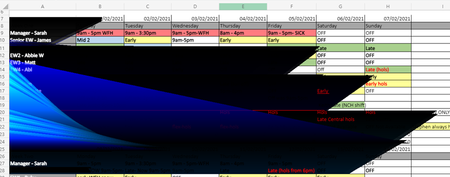
Strange black areas on Excel online

Since when does this problem exist?
Was the problem always like this, or did it arise after an update or a new program installation?
Does the problem only exist on your computer or on several computers?
Does the problem only exist with one document or also with a newly created document?
Where is the document? ... hard drive, OneDrive, network, Sharepoint, cloud, ect.
Do you have several versions of Office on your PC?
Additional actions you could do:
Install or update the next / latest version of Office applications.
Also, check for the latest upgrades of your operating system.
If the document is not on your PC, create a new one on your local PC and see if it behaves exactly the same.
Thank you again for your understanding and patience
Nikolino
I know I don't know anything (Socrates)

The problem has now existed for a few weeks and happens on all our computers. There were no newly installed programs, and as this only affects Excel online it should not be affected by those anyway. It works on the desktop app, but most of our workers don't have access to that. There have been no updates I am aware off. The problem only exists with this particular spreadsheet as far as I know, and it is stored on Sharepoint Online. The spreadsheet is mixed manually and conditionally formatted coloured. We are always using Edge as our browser, but the problem shows up in Chrome as well.
Any help would be greatly appreciated.
Kees
- mtarlerFeb 26, 2021Silver Contributor
just a stab in the dark but the way the shapes are 'pointing' at cells makes me think of Trace Precedents and Trace Dependents (which are black and blue lines/arrows). They are options available in the desktop version (Formulas -> Formula Auditing). Maybe try opening in desktop, select all, and Remove Arrows and saving and then try again in online?
- SergeiBaklanFeb 26, 2021Diamond ContributorI expect some bug in Excel Online working with some specific rule(s) in conditional formatting. But it's hard to be more concrete without the file or small sample with conditional formatting where such effect could be reproduced.
- NikolinoDEFeb 24, 2021Platinum ContributorI'm sorry not to have helped you. but it is difficult to test without having the same file.
If possible, remove all sensitive data from the file and submit this to see where the error may be.
Because if the problem is only with this file, then the problem comes from this file too.
If this is not possible, look for a software engineer you trust in your area and instruct him to restore this file.
hank you for your understanding and patience
Wish you a nice day.
Nikolino
I know I don't know anything (Socrates)  acorral15Feb 24, 2021Copper Contributor
I'm experiencing the same problem on excel online. This is affecting more than just one person in my team. The PDF suggestion did not work. NikolinoDE
- NikolinoDEFeb 24, 2021Platinum ContributorOne last try ... as strange as it sounds ... please change your standard printer to PDF and enter a print, then restart Excel and reset the old printer. If it has not been resolved, I recommend contacting microsoft support directly.
Thank you for your understanding and patience
Wish you a nice day.
Nikolino
I know I don't know anything (Socrates)

