Forum Discussion

Strange black areas on Excel online
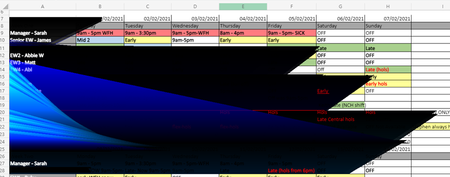

Same in english:
Display problem - black fields in Excel
Hi,
please proceed as follows:
Method 1:
Please deactivate the COM add-ins in Excel via File> Options> Add-Ins> COM-Add-Ins> Go to and test the behavior.
If this doesn't help, please also deactivate the Excel add-ins via File> Options> Add-Ins> Excel Add-Ins> Go to and test the behavior.
Method 2:
Set the check mark for Deactivate hardware graphics acceleration in Excel via File> Options> Advanced> Display and test the behavior.
Method 3:
- Close all Office applications.
- Press the key combination Windows key + R on your keyboard. The Run dialog box opens.
- Enter the command control printers and click OK.
- Right-click Microsoft XPS Document Writer and choose Set as Default Printer.
- Please test the behavior of Excel.
Method 4:
- Please close all Office applications.
- Press the key combination Windows key + R on your keyboard. The Run dialog box opens.
- Enter the command regedit and click OK. The registry editor opens.
- Please navigate to the following paths and rename the folder with the name Excel to Excel_1 (if available and possible):
HKEY_CURRENT_USER \ Software \ Microsoft \ Office \ Excel
HKEY_CURRENT_USER \ Software \ Microsoft \ Office \ 14.0 \ Excel
HKEY_LOCAL_MACHINE \ SOFTWARE \ Microsoft \ Office \ Excel
HKEY_LOCAL_MACHINE \ SOFTWARE \ Microsoft \ Office \ 14.0 \ Excel
HKEY_LOCAL_MACHINE \ SOFTWARE \ Wow6432Node \ Microsoft \ Office \ Excel
HKEY_LOCAL_MACHINE \ SOFTWARE \ Wow6432Node \ Microsoft \ Office \ 14.0 \ Excel
- Please close the registry editor and carry out an Office repair via the control panel.
- Please test the behavior.
I would be happy to know if this info from link help.
Nikolino
I know I don't know anything (Socrates)
* Kindly Mark and Vote this reply if it helps please, as it will be beneficial to more Community members reading here.

Again there is no File > Options > Add-ins, or File > Options > Advanced in Excel online, are you sure this answer refers to Excel online?
- NikolinoDEFeb 23, 2021Platinum Contributor
If you've considered all of the methods and tried them without success, take a look at this info. Maybe this will help you.
strange black lines on excel
Thank you for your understanding and patience
Nikolino
I know I don't know anything (Socrates)
- NikolinoDEFeb 23, 2021Platinum ContributorCould you please answer a few additional questions:
Since when does this problem exist?
Was the problem always like this, or did it arise after an update or a new program installation?
Does the problem only exist on your computer or on several computers?
Does the problem only exist with one document or also with a newly created document?
Where is the document? ... hard drive, OneDrive, network, Sharepoint, cloud, ect.
Do you have several versions of Office on your PC?
Additional actions you could do:
Install or update the next / latest version of Office applications.
Also, check for the latest upgrades of your operating system.
If the document is not on your PC, create a new one on your local PC and see if it behaves exactly the same.
Thank you again for your understanding and patience
Nikolino
I know I don't know anything (Socrates)- ymcanFeb 24, 2021Copper Contributor
The problem has now existed for a few weeks and happens on all our computers. There were no newly installed programs, and as this only affects Excel online it should not be affected by those anyway. It works on the desktop app, but most of our workers don't have access to that. There have been no updates I am aware off. The problem only exists with this particular spreadsheet as far as I know, and it is stored on Sharepoint Online. The spreadsheet is mixed manually and conditionally formatted coloured. We are always using Edge as our browser, but the problem shows up in Chrome as well.
Any help would be greatly appreciated.
Kees