Forum Discussion

#Spill! EXCEL

jb0y1e7 is it possible to send an excel file so we can trace the error together.
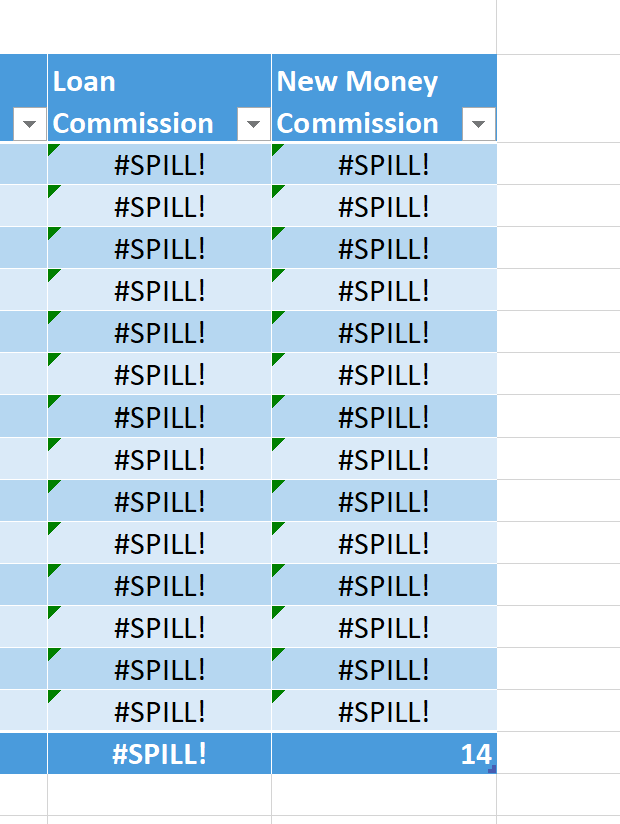
#SPILL errors are returned when a formula returns multiple results, and Excel cannot return the results to the grid.
 jb0y1e7Apr 25, 2020Copper Contributor
- PeterBartholomew1Apr 23, 2021Silver Contributor
 bdavid10Apr 23, 2021Copper ContributorThank you so much!
- wumoladApr 26, 2020Iron Contributor
Hi jb0y1e7
As Detlef_Lewin pointed out, you only need to refer to a cell and the formula is copied to other cells rather than referring to the whole column. Also, you do not need to use an array formula.
I have attached the updated file.
Cheers.
- Paper_QueenMar 22, 2021Copper Contributor
wumoladYou have no idea how helpful this is, I have been trying to complete an assignment with this specific formula for days now, and I haven't been able to figure it out. Thank you so much for explaining this!
- Detlef_LewinApr 26, 2020Silver Contributor
You formula refers to a whole column instead of a single cell:
=if([@Specialty]="Loans",[@[Account Values]]*0.0025,0)- bdavid10Apr 23, 2021Copper Contributor
Detlef_Lewin I am having the same problem with the #spill error for the formula using 0.0002, could you please help me out here?