Forum Discussion

#Spill! Error
- Dec 30, 2023
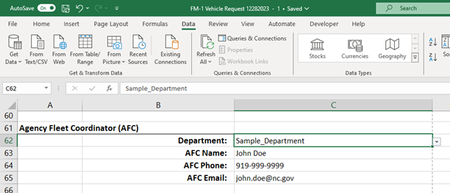
Bonnie107 Based on the information you've shared thus far, the setup seems a bit questionable to me. I'm not sure why you've used =INDIRECT(C62) to create a data validation picklist for cell C63 when the same formula has already been input directly in cell C63. Moreover, the table you've shared suggests there is only one VFC contact per department. As such, the XLOOKUP function could probably be used instead of INDIRECT to eliminate the need for creating 40+ named ranges. Please see the attached workbook for an example of how this could be setup...
Note: I was unable to duplicate the #SPILL! error using the INDIRECT method in the attached workbook. If you wish to pursue a solution to this method, please provide a screenshot of the Name Manager window, including the Name, Value, Refers To, and Scope columns for the three defined names in question. Kind regards.

Bonnie107 Based on the information you've shared thus far, the setup seems a bit questionable to me. I'm not sure why you've used =INDIRECT(C62) to create a data validation picklist for cell C63 when the same formula has already been input directly in cell C63. Moreover, the table you've shared suggests there is only one VFC contact per department. As such, the XLOOKUP function could probably be used instead of INDIRECT to eliminate the need for creating 40+ named ranges. Please see the attached workbook for an example of how this could be setup...
Note: I was unable to duplicate the #SPILL! error using the INDIRECT method in the attached workbook. If you wish to pursue a solution to this method, please provide a screenshot of the Name Manager window, including the Name, Value, Refers To, and Scope columns for the three defined names in question. Kind regards.

Thanks djclements ! XLOOKUP worked like a charm!