Forum Discussion

#Spill! Error
- Dec 30, 2023
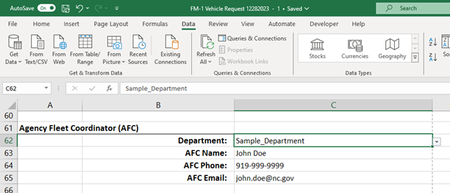
Bonnie107 Based on the information you've shared thus far, the setup seems a bit questionable to me. I'm not sure why you've used =INDIRECT(C62) to create a data validation picklist for cell C63 when the same formula has already been input directly in cell C63. Moreover, the table you've shared suggests there is only one VFC contact per department. As such, the XLOOKUP function could probably be used instead of INDIRECT to eliminate the need for creating 40+ named ranges. Please see the attached workbook for an example of how this could be setup...
Note: I was unable to duplicate the #SPILL! error using the INDIRECT method in the attached workbook. If you wish to pursue a solution to this method, please provide a screenshot of the Name Manager window, including the Name, Value, Refers To, and Scope columns for the three defined names in question. Kind regards.


Since you seem to have anonymized the names in this file already, it is possible for you to post the actual spreadsheet so we can take a look at it? Post it on OneDrive or GoogleDrive with a link here that grants access to it.
Having said that, I've never seen INDIRECT used within a data validation dialogue as you're showing it, as a way to retrieve data based on a separate entry. That doesn't mean it's invalid--and obviously it is working for some situations, but that's why seeing the actual would be helpful.
 Bonnie107Dec 29, 2023Copper ContributorAs a state government agency we're not allowed to use GoogleDrive, and our OneDrive requires a valid email address for sharing with another user. I could also email it, if that's possible.
- Riny_van_EekelenDec 29, 2023Platinum Contributor
Bonnie107 Then please start by showing us what you have in the named range "Education_Lottery_Commission".
- Bonnie107Dec 29, 2023Copper Contributor
These are the three Departments that result in errors. They are set up, formatted, and named exactly as the other 39 Departments.
Education_Lottery_Commission General_Assembly Wildlife_Resources_Commission Elizabeth Buono Chase Honeycutt Mark Dutton 919-301-3363 919-733-4292 919-707-0033 email address removed for privacy reasons email address removed for privacy reasons email address removed for privacy reasons
