Forum Discussion

Sorting with matching
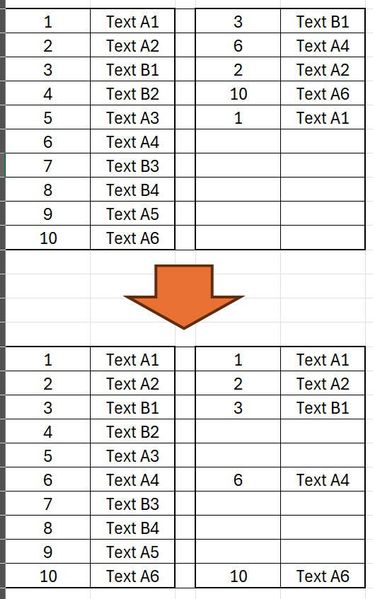
- May 08, 2024
BORMAC As a variant, without using LAMBDA helper functions:
=LET(
    rowId, XMATCH(B1:B10, E1:E5),
    HSTACK(
        EXPAND(A1:B10,, 3, ""),
        IF(ISNUMBER(rowId), INDEX(D1:E5, rowId, {1,2}), "")
    )
)
Please see the attached workbook to convert the functions to your language settings...


=LET(range1,A1:B10,
range2,D1:E5,
IFNA(DROP(REDUCE("",SEQUENCE(ROWS(range1)),
LAMBDA(u,v,
VSTACK(u,
HSTACK(
INDEX(range1,v,1),INDEX(range1,v,2),"",
IF(ISNUMBER(XMATCH(INDEX(range1,v,1)&INDEX(range1,v,2),INDEX(range2,,1)&INDEX(range2,,2))),HSTACK(INDEX(range1,v,1),INDEX(range1,v,2)),""))))),1),""))
This formula returns the expected result in my sample file.
Dziękuję za pomoc.
Od razu przepraszam, ale zapomniałem o 1 ważnym punkcie:
W moim problemie tylko kolumny B i E zawierają te same wartości, które trzeba porównać.
Kolumny A i D mają różne wartości i należy je posortować razem z sąsiednią komórką.
- djclementsMay 08, 2024Silver Contributor
BORMAC As a variant, without using LAMBDA helper functions:
=LET(
    rowId, XMATCH(B1:B10, E1:E5),
    HSTACK(
        EXPAND(A1:B10,, 3, ""),
        IF(ISNUMBER(rowId), INDEX(D1:E5, rowId, {1,2}), "")
    )
)
Please see the attached workbook to convert the functions to your language settings...
- BORMACMay 08, 2024Copper ContributorGreat!
Thank you very much - you solved my problem!