Forum Discussion

imik_plays
Apr 13, 2023Copper Contributor
Sorting script for certain sections.
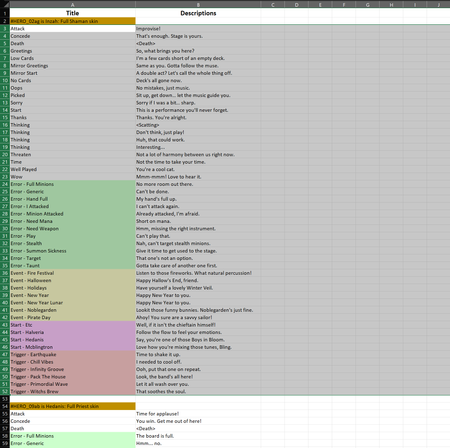
Hey there, I need to automatically sort values inside columns A and B (those values are getting filled in from another sheet), but inside each section only. A section is defined by a cell starting wi...

Yutao_Huang Microsoft
Apr 14, 2023MicrosoftHi imik_plays ,
Have you considered using Office Scripts? Here is one possible solution written in Office Script:
function main(workbook: ExcelScript.Workbook) {
  // Get the worksheet
  const sheet = workbook.getWorksheet("Sheet1");

  // Get the information of the used range
  const usedRange = sheet.getUsedRange();
  const startRowIndex = usedRange.getRowIndex();
  const endRowIndex = startRowIndex + usedRange.getRowCount() - 1;
  const startColumnIndex = usedRange.getColumnIndex();
  const columnCount = usedRange.getColumnCount();

  // Find the start row indexes of each section
  const sectionRows = usedRange
    .getColumn(0)
    .getValues()
    .map((row, index) => ({ value: row[0] as string, start: index }))
    .filter(row => row.value.startsWith("#"));

  // Iterate through and sort each section
  for (let index = 0; index < sectionRows.length; index++) {
    const sectionEndRowIndex = index < sectionRows.length - 1 ? sectionRows[index + 1].start - 2 : endRowIndex;
    const sectionRowCount = sectionEndRowIndex - sectionRows[index].start;
    const sectionRange = sheet.getRangeByIndexes(sectionRows[index].start + 1, startColumnIndex, sectionRowCount, columnCount);
    sectionRange.getSort().apply([{ key: 0, ascending: true }], false, false, ExcelScript.SortOrientation.rows);
  }
}
You can create a script by selecting "New Script" from the "Automate" tab and paste the above script code into the editor.
After saving the script, you can then click on "Run" to run it. Please note this script assumes your worksheet is named "Sheet1" so you need to update it for different sheet names.
You can even create a button on the worksheet for this script if you want.
Please let me know if you have any further questions regarding using Office Scripts.