Forum Discussion

beewing
Jun 24, 2024Copper Contributor
Sorting grouped rows - troubleshooting
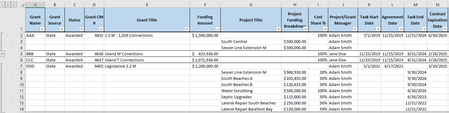
I have been working on a problem in a sheet I have been building to track grants and projects for my program. In this sheet, data is sorted by grant IDs and their associated projects. Grants are grou...

JKPieterse
Jun 24, 2024Silver Contributor
Table sorting doesn't work like this. You must make sure all rows of the grouped columns contain data. All rows about grant AAA must have AAA in the first table column, and etcetera.
Once you've filled your table like that, consider creating a pivot table from the raw table rather than using the grouping option. It is always a better idea to keep your data as is and do the analysis elsewhere in the file.
To get your blanks filled:
- Select the columns containing blank cells
- Press the F5 key, then click "Special"
- Select "Blanks"
- Hit the = sign on your keyboard and then press the up-arrow key once.
- Press Control+Enter
- Now select those same columns again
- Hit control+C
- Do a paste-special, Values only.
Once you've filled your table like that, consider creating a pivot table from the raw table rather than using the grouping option. It is always a better idea to keep your data as is and do the analysis elsewhere in the file.
To get your blanks filled:
- Select the columns containing blank cells
- Press the F5 key, then click "Special"
- Select "Blanks"
- Hit the = sign on your keyboard and then press the up-arrow key once.
- Press Control+Enter
- Now select those same columns again
- Hit control+C
- Do a paste-special, Values only.