Forum Discussion

Sorting column groups having shared rows?
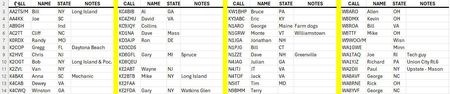

I would separate storage from display. Keep one master table with four columns only: Call, Name, State, and Notes. Add every participant to the bottom of that master table, then sort that table by Call. On a second sheet, build the one-screen view from the sorted master list so Excel can wrap the records across the page without changing the underlying data. In Microsoft 365, the display sheet can use SORT to order the master data and WRAPROWS or a similar layout formula to split it into four-column groups. That way you never sort only part of a row and accidentally detach a call sign from the name or state. The master list stays boring, which is exactly what makes it reliable.

Thank you Owen!
Similar ideas have been shared by others also, and I appreciate ALL of them!