Forum Discussion

Sorting column groups having shared rows?
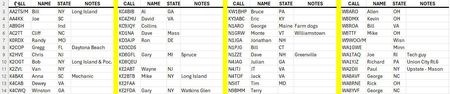

Yes. First I would keep 1 tab as the master list. Then on a separate tab I would have that header an in cell A3 post:
=LET(data, SORT(DataTable), r, ROUNDUP(ROWS(data)/4,0),
         IFERROR(HSTACK(CHOOSEROWS(data,SEQUENCE(r)),"",
                                      CHOOSEROWS(data,SEQUENCE(r,,r+1)),"",
                                      CHOOSEROWS(data,SEQUENCE(r,,2*r+1)),"",
                                      CHOOSEROWS(data, SEQUENCE(ROWS(data)-3*r,,3*r+1))),
                         "")
          )
where DataTable is a reference to that master list (I recommend making that list 'Format as a Table' and name that table accordingly so that named range will automatically expand as you add names.
for a more generalized LAMBDA function to do this, Patrick2788 just posted a set of library functions including a reshaping grid function that should handle this well.
EDIT.. a) I realize I forgot the sort function so I added it to the function above (that way you don't have to worry if you sorted the original list. And b) w/r to Patrick's function: =WrapRows2Dλ(data,10) I might recommend a slight variant: =WrapRows2Dλ(data,ROUNDUP(ROWS(data)/4,0) ) so it will always produce the 4 columns you wanted.