Forum Discussion

Sort data based on the right hand value within a cell containing a string of data
- Aug 27, 2021
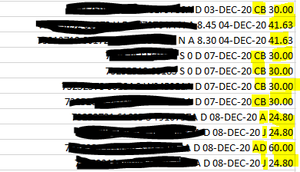
The following assumes that there will always be ...-nn (from a date in DD-MMM-YY format) before the value you want to sort on.
Let's say the data are in A2 and down.
In B2, enter the following formula:
=MID(RIGHT(SUBSTITUTE(A2, "-", REPT("-", 255)), 255), FIND(" ", RIGHT(SUBSTITUTE(A2, "-", REPT("-", 255)), 255))+1, 100)
Fill down.
Select B2, then sort.
P.S. This will treat all end values as text.

The following assumes that there will always be ...-nn (from a date in DD-MMM-YY format) before the value you want to sort on.
Let's say the data are in A2 and down.
In B2, enter the following formula:
=MID(RIGHT(SUBSTITUTE(A2, "-", REPT("-", 255)), 255), FIND(" ", RIGHT(SUBSTITUTE(A2, "-", REPT("-", 255)), 255))+1, 100)
Fill down.
Select B2, then sort.
P.S. This will treat all end values as text.

HansVogelaar thank you so much for taking the time to answer my query. It works a treat and has saved me a huge amount of time.