Forum Discussion

CJKDB1501
Aug 08, 2022Copper Contributor
Solver AddIn doesn't change values
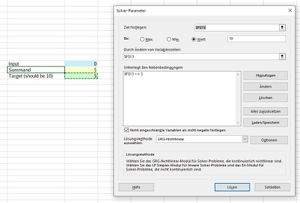
Since last Thursday Solver Addin in Excel isn't working anymore. I says, it has found a solution, but input value is unchanged. Even for simple problems like "find x that x+5=10". Even if one defines...

JKPieterse
Aug 08, 2022Silver Contributor
After clicking the reply link, click the "Open full text editor" link. There's an option there to upload files.

CJKDB1501
Aug 08, 2022Copper Contributor
JKPieterse Sry, but I don't see any. I only have the option to add pictures
- JKPieterseAug 08, 2022Silver Contributor
CJKDB1501 Are you saying you don't see this:
- CJKDB1501Aug 08, 2022Copper Contributor
JKPieterse No, I don't see this part, highlighted in your screenshot when I reply to forum messages.
- JKPieterseAug 08, 2022Silver Contributor
CJKDB1501 OK, perhaps not all users get that feature here. I didn't know that, apologies.
- HansVogelaarAug 08, 2022MVP
Here is the workbook you sent me by PM.
When I run Solver, I get this result (I'm using Excel 2021, fully updated):
What do others get?
- CJKDB1501Aug 08, 2022Copper ContributorAs described, Solver says it has found a solution, but the blue input cell stays 0
My version is "Microsoft® Excel® für Microsoft 365 MSO (16.0.14326.21008) 32-Bit"- CJKDB1501Aug 12, 2022Copper ContributorIssue seems to be gone in Excel version "Microsoft® Excel® für Microsoft 365 MSO (16.0.14326.21076) 32-Bit "
- JKPieterseAug 08, 2022Silver ContributorI confirm the result of HansVogelaar
