Forum Discussion

[Solved] I cant use Item specifier i.e #All and #Headers
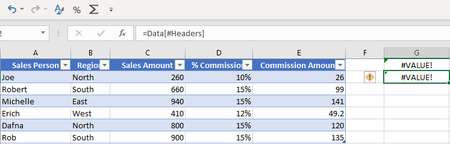

Those references return multiple cells. Excel in Microsoft 365 and Office 2021 handle this automatically, but older versions don't.
You can use =Data[[#Headers],[Sales Person]] and drag it to the right.
- Mike_Vu_NgoNov 23, 2021Copper Contributor
HansVogelaarHello. I tried what you said and the result is... interesting.
- Data[#Headers] only works if the cell I entered the formula is directly on the same column of the header i.e Sales Person, Sales Amount. etc...
- Data[[#Headers],[Sales Person]] works anywhere (only return the headers), as I drag right it shows other headers and works fine.- Data[[#data],[Sales Person]] don't work. I tried changing the name of table, can't make it work.
- Data[Sales Person] show the value of cell of the same row and under the Sales Person header. So it must be placed on the same row of the table for it to work.In conclusion I can get around the problem. However, still can't make [#all],[#data],[#totals] to work.
