Forum Discussion

xtian
Jul 18, 2024Copper Contributor
SOLVED - Drag to “fill” not working -- copies value and not formula - #2
I found this post title which describes the same issue: drag to “fill” not working – value is copied, formula ignored That solution is "missing a 'relative' reference". I don't think that's the pro...

m_tarler
Jul 18, 2024Silver Contributor
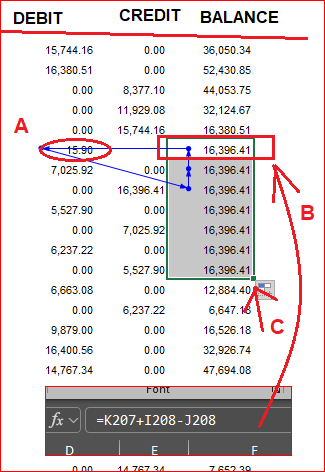
Based on the arrows, I'm guessing the error that was flagged was a circular reference error? (if not please tell us what the error was)
You also don't tell us the formula you added for the "adjusting calculation (A)", but I suspect that is causing the circular ref error. if you don't need that formula anymore (i.e. used it to calc the value but don't need it to keep/dynamically update then copy and "paste values only" to overwrite the formula with just the value.
You also don't tell us the formula you added for the "adjusting calculation (A)", but I suspect that is causing the circular ref error. if you don't need that formula anymore (i.e. used it to calc the value but don't need it to keep/dynamically update then copy and "paste values only" to overwrite the formula with just the value.