Forum Discussion

Slicer Trouble
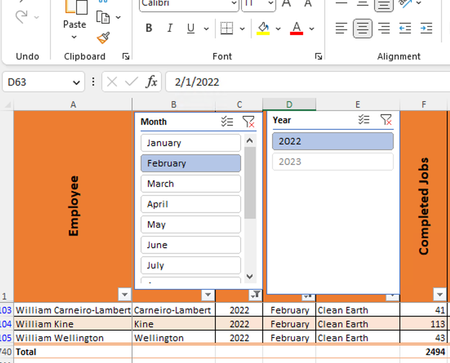
- Mar 14, 2023
The slicers show the formatted serial date as "January" but the cell content still is 01/01/2022. And if you filter for year 2023 and don't reset the slicer for the month it will filter for 01/01/2022. And there is no match.
I would suggest a date column and for the year and month use the TEXT() function.
=TEXT(date;"YYYY")
=TEXT(date;"MMMM")

The slicers show the formatted serial date as "January" but the cell content still is 01/01/2022. And if you filter for year 2023 and don't reset the slicer for the month it will filter for 01/01/2022. And there is no match.
I would suggest a date column and for the year and month use the TEXT() function.
=TEXT(date;"YYYY")
=TEXT(date;"MMMM")
 jabel49048Mar 14, 2023Tin Contributor
Detlef_Lewin Ok. Are you saying to leave the formatting of the column as date with custom format of "mmmm" and "yyyy" respectively but the cell contents to be =TEXT(2/1/2023,"MMMM")? When I put this value in the cell, it shows up as January but obviously should be February.
- Detlef_LewinMar 14, 2023Silver Contributor
That depends on your regional settings in Windows.
It is probably not dd/mm/yyyy but mm/dd/yyyy.
- jabel49048Mar 14, 2023Tin Contributor
Detlef_Lewin I tried =TEST(1/1/2023,"mmmm") and also =TEXT(2/1/2023,"mmmm") and got the same result of "January" when expecting February. See screen-shot below.