Forum Discussion

AhmedMedhat66
Mar 15, 2023Copper Contributor
Skip empty cells when preforming a function
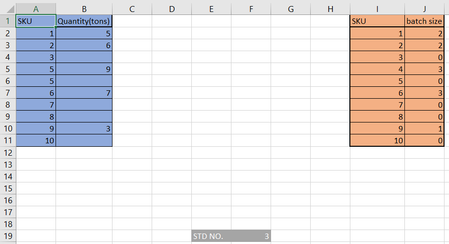
I only want to display in the table on the right the values which have values adjacent to their SKUs. meaning that I don't want SKU 3, 5, 7, 8 and 10 (any SKU that doesn't have a quantity value besi...
 Mar 15, 2023
=IFERROR(INDEX(A$2:A$11,SMALL(IF($B$2:$B$11<>"",ROW($B$2:$B$11)-1),ROW($B1))),"")You can try this formula. Enter the formula with ctrl+shift+enter if you don't work with Office 365 or Excel 2021. The formula is in cell E2 and filled across range E2:F10 in the example.
If you work with Office 365 you can apply the FILTER function.
OliverScheurich
Mar 15, 2023Gold Contributor
=IFERROR(INDEX(A$2:A$11,SMALL(IF($B$2:$B$11<>"",ROW($B$2:$B$11)-1),ROW($B1))),"")You can try this formula. Enter the formula with ctrl+shift+enter if you don't work with Office 365 or Excel 2021. The formula is in cell E2 and filled across range E2:F10 in the example.
If you work with Office 365 you can apply the FILTER function.

AhmedMedhat66
Mar 17, 2023Copper Contributor
OliverScheurich
the function works like magic, thanks alot
the function works like magic, thanks alot
- SergeiBaklanMar 17, 2023Diamond Contributor
Practically the same
=IFERROR( INDEX( $A$2:$A$11, AGGREGATE(15,6, 1/($B$2:$B$11<>"")*(ROW($A$2:$A$11)-ROW($A$1)), ROW()-ROW($E$1)) ), "" )
