Forum Discussion

AhmedMedhat66
Mar 15, 2023Copper Contributor
Skip empty cells when preforming a function
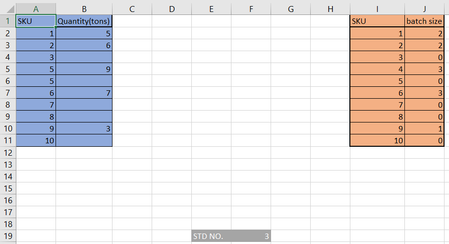
I only want to display in the table on the right the values which have values adjacent to their SKUs. meaning that I don't want SKU 3, 5, 7, 8 and 10 (any SKU that doesn't have a quantity value besi...
 Mar 15, 2023
=IFERROR(INDEX(A$2:A$11,SMALL(IF($B$2:$B$11<>"",ROW($B$2:$B$11)-1),ROW($B1))),"")You can try this formula. Enter the formula with ctrl+shift+enter if you don't work with Office 365 or Excel 2021. The formula is in cell E2 and filled across range E2:F10 in the example.
If you work with Office 365 you can apply the FILTER function.

AhmedMedhat66
Mar 15, 2023Copper Contributor
here's a link to the google excel sheet for reference:
https://docs.google.com/spreadsheets/d/16n_G_j4X6nz1ORwvpm1eDwNApeMj6aKi3R8wOP0m1a0/edit?usp=sharing
https://docs.google.com/spreadsheets/d/16n_G_j4X6nz1ORwvpm1eDwNApeMj6aKi3R8wOP0m1a0/edit?usp=sharing
- OliverScheurichMar 15, 2023Gold Contributor
=IFERROR(INDEX(A$2:A$11,SMALL(IF($B$2:$B$11<>"",ROW($B$2:$B$11)-1),ROW($B1))),"")You can try this formula. Enter the formula with ctrl+shift+enter if you don't work with Office 365 or Excel 2021. The formula is in cell E2 and filled across range E2:F10 in the example.
If you work with Office 365 you can apply the FILTER function.
- AhmedMedhat66Mar 17, 2023Copper ContributorOliverScheurich
the function works like magic, thanks alot- SergeiBaklanMar 17, 2023Diamond Contributor
Practically the same
=IFERROR( INDEX( $A$2:$A$11, AGGREGATE(15,6, 1/($B$2:$B$11<>"")*(ROW($A$2:$A$11)-ROW($A$1)), ROW()-ROW($E$1)) ), "" )
