Forum Discussion

SEANSKIM15
Jan 31, 2023Copper Contributor
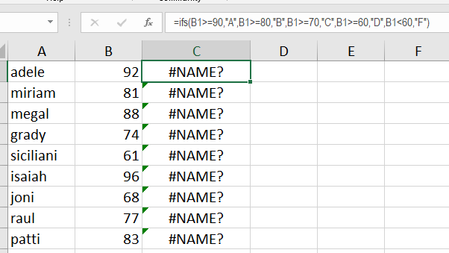
simple IFS formula. what am i doing wrong here?
Please guide me... why am i getting #NAME?

Harun24HR
Jan 31, 2023Silver Contributor
SEANSKIM15 Your formula look correct. What is your excel version? Do you have access to IFS() function on your version of excel? Below formula give me correct result.
=IFS(B1>=90,"A",B1>=80,"B",B1>=70,"C",B1>=60,"D",B1<60,"F")Based on regional and language settings, you may need to use semicolon (;) rather than comma (,). You B column data may stored as text. Otherwise your formula structure is correct.