Forum Discussion

StevenRidinSoLow
Jun 01, 2023Copper Contributor
Similar cell autofill help
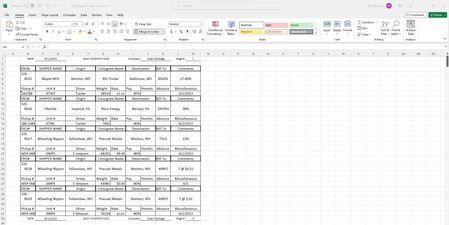
Can anyone tell by looking at this pic if there is any way of making the cells similar so autofill will save me time on the repeating information? The boxes are checked in the settings

StevenRidinSoLow
Jun 02, 2023Copper Contributor
I appreciate the reply. I tried that but it connects all 4 sets C-D/E-F/G-H/I-J into one cell centering Wheeling in between F and G.
I just want it to predict what I am trying to enter like my Checking register does(which has merged cells but they aren't separated up and down by unmerged cells.
As you see there are 3 loads in just 5 sections on that sheet that are almost Identical. That happens every day. At the end of the month there can be upwards of 2500 lines being used. If It could see I'm typing "Wheel" and notice I've previously used "Wheeling Nippon" and autofill/predictive text, It would save me tons of time.
I just want it to predict what I am trying to enter like my Checking register does(which has merged cells but they aren't separated up and down by unmerged cells.
As you see there are 3 loads in just 5 sections on that sheet that are almost Identical. That happens every day. At the end of the month there can be upwards of 2500 lines being used. If It could see I'm typing "Wheel" and notice I've previously used "Wheeling Nippon" and autofill/predictive text, It would save me tons of time.

mtarler
Jun 02, 2023Silver Contributor
You have to do that formatting for EACH section that is presently merged. So cells C3:D3 are merged with "SHIPPER NAME" so you highlight it and unmerge. Then, with C3:D3 highlighted you select format cell and tell it to center across selection. Repeat for all those others.
Or better yet completely change the format so you have a normal single line structure to your table. If you want or need this version for viewing or printing then create a reporting tab and pull the data from the master input table and format it this way for viewing/printing
Or better yet completely change the format so you have a normal single line structure to your table. If you want or need this version for viewing or printing then create a reporting tab and pull the data from the master input table and format it this way for viewing/printing
- StevenRidinSoLowJun 02, 2023Copper ContributorIve tried. I get the same result. Once I try to enter data in C-D5 Its completely centered on F-G. even though I went and only did the suggestion on each set for cells.
I think the issue here is the example is a fully filled out sheet, ready for printing.
Lines 5-8-11-14-17-20-23-26-29 With the exception's of B5-B11-B17-B23 & B32. Are void of Data. That is where I type the data for the Pro# say 326-8528. Otherwise they are blank- mtarlerJun 02, 2023Silver ContributorI don't understand what is happening with the centering. As for the format, I still recommend having an input table and then an output/report tab
If you can share the workbook (attach here, provide link to online version, send via PM) i could help more (make sure there is no private information)- mtarlerJun 02, 2023Silver Contributor
So yes now drivers starting with d or dr... will autosuggest 'driver' but if the name is dave then you just need da or drisco you will need to get to dris.
In that attached I gave a sample concept of what I mean by input output tabs. note a lot more could be done to improve the layout of the output version