Forum Discussion

philipo51617
Feb 20, 2019Copper Contributor
Show average of cells which display X text.
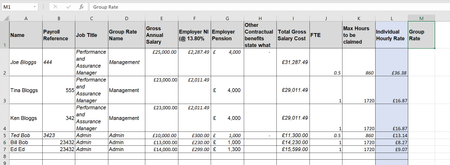
Hi Please can you help create a formula for the below:.. In column M, what is the formula i would need if i wanted to take an average of column L, based on what text is based in colu...

ryan_k
Feb 20, 2019Tin Contributor
You could use the AVERAGEIFS() function to accomplish this. Specifically, for your case M2 would look like =averageifs($K$2:$K$7,$D$2:$D$7,D2). You can then drag this cell down for the whole column.
You can look up the averageifs command for more information about how it is working.

philipo51617
Feb 20, 2019Copper Contributor
thanks for quick response, will have a play round and see what works best.
- TwifooFeb 23, 2019Silver ContributorThe formula in M2, copied down to M7, is:
=SUMPRODUCT((D$2:D$7=D2)*K$2:K$7,L$2:L$7)/
SUMIF(D$2:D$7,D2,K$2:K$7)
The foregoing formula returns the weighted average, taking into consideration the maximum number of hours that can be claimed by each employee. The AVERAGE, AVERAGEIF, and AVERAGEIFS functions in Excel only return the simple average, ignoring any weighting factor.
