Forum Discussion

19adam99
Apr 21, 2025Copper Contributor
Shorten to certain characters and perform IF formula
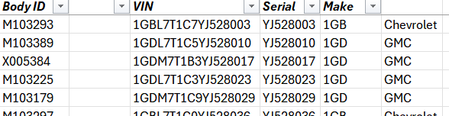
Good morning/afternoon/evening all I'm sure this is probably something simple I'm missing but I'm in a spot where I am trying to add a manufacturer indicator based upon the first three characters of...
- Apr 21, 2025
In F2:
=IF(LEFT(D2, 3)="1GB", "Chevrolet", "GMC")
Alternatively:
Create a table elsewhere with 2 columns Make and Brand. Name the table - for example - Makes.
Add a row for each unique make:
The formula in F2 can then be =XLOOKUP(LEFT(D2, Makes[Make], Makes[Brand], "")
This makes it easy to add new makes in the future, if necessary.

HansVogelaar
Apr 21, 2025MVP
In F2:
=IF(LEFT(D2, 3)="1GB", "Chevrolet", "GMC")
Alternatively:
Create a table elsewhere with 2 columns Make and Brand. Name the table - for example - Makes.
Add a row for each unique make:
The formula in F2 can then be =XLOOKUP(LEFT(D2, Makes[Make], Makes[Brand], "")
This makes it easy to add new makes in the future, if necessary.