Forum Discussion

Phishdawg
Apr 08, 2023Brass Contributor
Sheet Content Not Responding
I copied all the data from several sheets into one sheet; That sheet now has more than 700,000 items. I want to now format some of the columns, for instance center A, change A and D to Date. ...
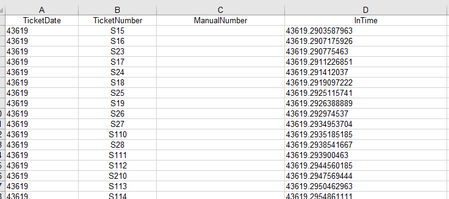
- Apr 08, 2023The fact that A and D are lined up on the left side of the cell would indicate that they're there as text, not as numbers. What you'll need to do is create a couple of temporary "helper columns" so as to convert the text into values. The formula =VALUE(A2) copied down in the column to the bottom of all these rows will turn 43619 into whatever value it is; then you'll be able to format that value as a date. Once that's done, assuming you want it in column A, you can select the entire column from that temporary helper column and do a Copy.....Paste Special .... Values and Number Format from the helper column into column A. Just make sure you use Copy and Paste Special ... Then the same with column D.

mathetes
Apr 08, 2023Gold Contributor
The fact that A and D are lined up on the left side of the cell would indicate that they're there as text, not as numbers. What you'll need to do is create a couple of temporary "helper columns" so as to convert the text into values. The formula =VALUE(A2) copied down in the column to the bottom of all these rows will turn 43619 into whatever value it is; then you'll be able to format that value as a date. Once that's done, assuming you want it in column A, you can select the entire column from that temporary helper column and do a Copy.....Paste Special .... Values and Number Format from the helper column into column A. Just make sure you use Copy and Paste Special ... Then the same with column D.