Forum Discussion

frankb3892
Jan 22, 2019Tin Contributor
Setting Default Pivot Table Options does not work (Excel 2016?)
Hello All, I recently discovered the new feature in Excel 2016 that allows you to set the default options for pivot tables in Options>Data>Edit Default Layout>PivotTable Options. I was very exci...
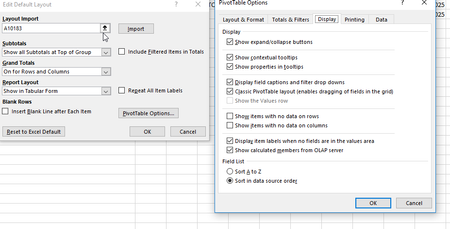

frankb3892
Jan 23, 2019Tin Contributor
Generally I use the Pivot Table and PivotChart Wizard quick access button.
frankb3892
Jan 23, 2019Tin Contributor
I just did standard Insert>Pivot Table and it DID work! is there another quick access button that would work? Small request but would be great if MS could fix that.
Appreciate the clue into getting this working!!
Appreciate the clue into getting this working!!
 Andrea_217Apr 21, 2020Copper ContributorHi! I am still having the same issue where new pivot tables are not using the custom default settings I edited. How did you get it to work? Just Insert>Pivot table isn't working for me. 😞
- JKPieterseApr 21, 2020Silver ContributorThe default only works for "modern" pivot tables, it does not work for "old style" pivots inserted using the old school pivot table and pivot chart wizard
 alexandrub290Jul 16, 2020Copper Contributor
I have a similar issue, and is even weirder in my case.
If I insert a pivot using Insert-->Pivot Table, it works
But if I do Alt+D+P (shortcut for insert pivot) and then Alt+F (which is Finish) then it still uses the old layout.
I normally prefer using keyboard shortcuts and not clicking.
Any solution to this?
- JKPieterseJan 23, 2019Silver ContributorYou could just right-click the button on the insert tab and select add to QAT.
