Forum Discussion

Setting Default Pivot Table Options does not work (Excel 2016?)
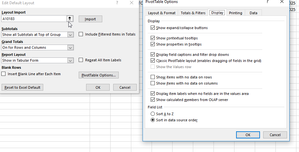


 alexandrub290Jul 16, 2020Copper Contributor
I have a similar issue, and is even weirder in my case.
If I insert a pivot using Insert-->Pivot Table, it works
But if I do Alt+D+P (shortcut for insert pivot) and then Alt+F (which is Finish) then it still uses the old layout.
I normally prefer using keyboard shortcuts and not clicking.
Any solution to this?
- JKPieterseJul 17, 2020Silver ContributorAlt+D, P is the keyboard shortcut for the old Pivottable Wizard I'm afraid, you cannot change that. Alt+N, V is the short-cut key for the new one. You can also add the insert Pivottable button to your QAT. Then it is alt + the-number-where-it-is-positioned-on-your-QAT.
- SergeiBaklanJul 20, 2020Diamond Contributor
My understanding is that
- the only difference, except cosmetic, between old Alt+D+P wizard and new one is that with new wizard we could add or not data to data model (by default it is added) and old wizard doesn't have such option at all, data never added to the data model;
- If do not add to data model, dates are automatically grouped or not depends on setting,
- starting from 2016 if that setting was on, dates hierarchy automatically was built in data model for the table, if only no one else table in data model was marked as Date Table.
- currently automagical time grouping doesn't work for data model, only for separate from it PivotTable.
- Andrea_217Apr 21, 2020Copper ContributorOkay, understandable. So how do I insert a "modern" pivot table?
- JKPieterseApr 21, 2020Silver ContributorIt should work on pivots inserted using the button on the Insert tab of the ribbon as far as I know. Check out Excel Options, is there a Data tab there which has a button to edit the default?
- Andrea_217Apr 21, 2020Copper ContributorYes. I was able to complete all of the steps to edit the default layout of the pivot tables.
I cannot figure out why it won't work. The videos I watched showing me how to edit the default layout don't show this problem at all and I followed them step by step.
