Forum Discussion

Set VBA Conditional Format highlight cell not equals 0 and amend subtraction to formula
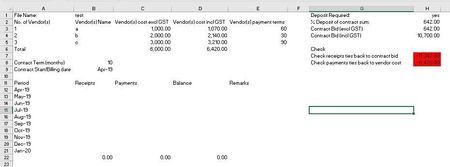
- Jul 27, 2022
1. About conditional formatting: the first one looks OK, but in the second one you should change xlExpression to xlCellValue (as in the first one)
2. For the formulas:
ws.Range("G" & check + 3).Offset(0, 1).Formula = "=B" & receiptsLastrow & "-" & contractbid.Offset(0, 1).Address(False, False)
and
ws.Range("G" & check + 4).Offset(0, 1).Formula = "=C" & paymentsLastrow & "-" & vendortotal.Offset(0, 3).Address(False, False)

The line with the formula should probably be
ws.Range("G" & check + 3).Offset(0, 1).Formula = "=B" & receiptsLastrow & "-H2+H4"
Without seeing the workbook it's impossible to tell why the conditional formatting isn't applied.
P.S. Please indent your code consistently. It is very difficult to read it without proper indentation.
Sub checkcal()
    Dim check As Long
    Dim ws As Worksheet
    Dim receiptsLastrow As Long
    Dim paymentsLastrow As Long
    Dim contractbid As Range
    Dim vendortotal As Range
    Set ws = Sheet1
    check = ws.Cells(ws.Rows.Count, "G").End(xlUp).Row
    ws.Range("G" & check + 2).Value = "Check"
    ws.Range("G" & check + 3).Value = "Check receipts ties back to contract bid"
    ws.Range("G" & check + 4).Value = "Check payments ties back to vendor cost"
    receiptsLastrow = ws.Cells(ws.Rows.Count, "B").End(xlUp).Row
    paymentsLastrow = ws.Cells(ws.Rows.Count, "C").End(xlUp).Row
    If ws.Range("H1") = "Yes" Then
        ws.Range("G" & check + 3).Offset(0, 1).Formula = "=B" & receiptsLastrow & "-H2+H4"
        ws.Range("G" & check + 3).Offset(0, 1).NumberFormat = "#,##0.00"
        With ws.Range("G" & check + 3).Offset(0, 1) '<-- condition formatting to fill cell in red if cell value <> 0
            .FormatConditions.Delete
            .FormatConditions.Add Type:=xlCellValue, Operator:=xlNotEqual, _
             Formula1:="=0"
            With Selection.FormatConditions(1).Interior
                .Color = vbRed
            End With
        End With
        With ws.Cells
            Set vendortotal = .Find(What:="Total", After:=ActiveCell, LookIn:=xlValues _
                , Lookat:=xlPart, SearchOrder:=xlByRows, SearchDirection:=xlNext, _
                MatchCase:=False)
        End With
        ws.Range("G" & check + 4).Offset(0, 1).Formula = "=C" & paymentsLastrow & "-" & vendortotal.Offset(0, 3).Address(False, False)
        ws.Range("G" & check + 4).Offset(0, 1).NumberFormat = "#,##0.00"
        With ws.Range("G" & check + 4).Offset(0, 1) '<-- condition formatting to fill cell in red if cell value <> 0
            .FormatConditions.Delete
            .FormatConditions.Add Type:=xlCellValue, Operator:=xlNotEqual, _
             Formula1:="=0"
            With Selection.FormatConditions(1).Interior
               .Color = vbRed
            End With
        End With
    Else
        With ws.Cells
            Set contractbid = .Find(What:="Contract Bid (incl GST)", After:=ActiveCell, LookIn:=xlValues _
                , Lookat:=xlPart, SearchOrder:=xlByRows, SearchDirection:=xlNext, _
                MatchCase:=False)
        End With
        ws.Range("G" & check + 3).Offset(0, 1).Formula = "=B" & receiptsLastrow & "-" & contractbid.Offset(0, 1).Address(False, False)
        ws.Range("G" & check + 3).Offset(0, 1).NumberFormat = "#,##0.00"
        With ws.Range("G" & check + 3).Offset(0, 1) '<-- condition formatting to fill cell in red if cell value <> 0
            .FormatConditions.Delete
            .FormatConditions.Add Type:=xlCellValue, Operator:=xlNotEqual, _
             Formula1:="=0"
            With Selection.FormatConditions(1).Interior
                .Color = vbRed
            End With
        End With
        With ws.Cells
            Set vendortotal = .Find(What:="Total", After:=ActiveCell, LookIn:=xlValues _
                , Lookat:=xlPart, SearchOrder:=xlByRows, SearchDirection:=xlNext, _
                MatchCase:=False)
        End With
        ws.Range("G" & check + 4).Offset(0, 1).Formula = "=C" & paymentsLastrow & "-" & vendortotal.Offset(0, 3).Address(False, False)
        ws.Range("G" & check + 4).Offset(0, 1).NumberFormat = "#,##0.00"
        With ws.Range("G" & check + 4).Offset(0, 1) '<-- condition formatting to fill cell in red if cell value <> 0
            .FormatConditions.Delete
            .FormatConditions.Add Type:=xlCellValue, Operator:=xlNotEqual, _
             Formula1:="=0"
            With Selection.FormatConditions(1).Interior
                .Color = vbRed
            End With
        End With
    End If
End Sub
HansVogelaar , turns out the IF Else did not solve the issue. Managed to use the macro recorder to tweak the conditional formatting to be dynamic.
Sub checkcal()

    Dim lastRowH    As Long

    Set ws = Sheet1

    lastRowH = ws.Cells(ws.Rows.Count, "G").End(xlUp).row

    ws.Range("H" & lastRowH).Offset(-1).Select
    Selection.FormatConditions.Add Type:=xlCellValue, Operator:=xlNotEqual, _
                                   Formula1:="=0"
    With Selection.FormatConditions(1).Interior
        .Color = 255
    End With

    ws.Range("H" & lastRowH).Select
    Selection.FormatConditions.Add Type:=xlCellValue, Operator:=xlNotEqual, _
                                   Formula1:="=0"
    With Selection.FormatConditions(1).Interior
        .Color = 255
    End With

End Sub