Forum Discussion

Drazic4
Jul 17, 2024Copper Contributor
Select first and last dates subject appears
Hello, I want to select the first recorded start date and the final recorded end date of clients with multiple entries (they can move across various locations in our housing service) to calculate th...
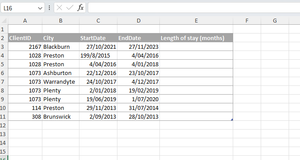

HansVogelaar
Jul 17, 2024MVP
Like this:
=DATEDIF(MINIFS([StartDate], [ClientID], [@ClientID]), MAXIFS([EndDate], [ClientID], [@ClientID]), "m")

Drazic4
Jul 22, 2024Copper Contributor
Thank you! This gives the total stay where multiple entries occur but shows that value against all of those entries. Is there a way I can just show the total length of stay against, say, the first or last entry, leaving the other results blank?
- HansVogelaarJul 22, 2024MVP
Try
=IF([@EndDate]=MAXIFS([EndDate], [ClientID], [@ClientID]), DATEDIF(MINIFS([StartDate], [ClientID], [@ClientID]), MAXIFS([EndDate], [ClientID], [@ClientID]), "m"), "")
or
=IF([@StartDate]=MINIFS([StartDate], [ClientID], [@ClientID]), DATEDIF(MINIFS([StartDate], [ClientID], [@ClientID]), MAXIFS([EndDate], [ClientID], [@ClientID]), "m"), "")
- Drazic4Jul 22, 2024Copper ContributorBrilliant!. Thank you