Forum Discussion

markplumridge
Aug 31, 2021Copper Contributor
Select data within Multiple Rows within date ranges
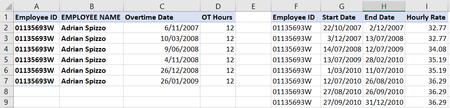
I need to find an hourly rate for an employee the range falls within the date that the overtime was worked. Here is a sample of the data set Can somebody help me with a formulae to lookup wit...
- Sep 02, 2021
Based on initial screenshot that could be like
=LOOKUP(2, 1/ ( $G2:$G9 = A2 )/ (C2>=$H$2:$H$9)/ (C2<=$I$2:$I$9), $J$2:$J$9)For entire range, using dynamic one
=LOOKUP(2, 1/
 ( $G$2:INDEX($G:$G, COUNTA($G:$G)) = $A2 ) /
 ( $C2 >= $H$2:INDEX($H:$H, COUNTA($H:$H)) )/
 ( $C2 <= $I$2:INDEX($I:$I, COUNTA($I:$I)) ),
 $J$2:INDEX($J:$J, COUNTA($J:$J)))

markplumridge
Sep 02, 2021Copper Contributor
Thanks Yea_So
I cant follow your suggestion. I am trying to lookup the hourly rate that the Overtime date falls between so I can use this to calculate a cost using the OT hrs.
Also my actual spreadsheet has over 4000 rows for approx. 130 employees with different range of salary dates so I am unsure how to use your method with this volume of dates.
Hope your can still help!
I cant follow your suggestion. I am trying to lookup the hourly rate that the Overtime date falls between so I can use this to calculate a cost using the OT hrs.
Also my actual spreadsheet has over 4000 rows for approx. 130 employees with different range of salary dates so I am unsure how to use your method with this volume of dates.
Hope your can still help!

SergeiBaklan
Sep 02, 2021Diamond Contributor
Based on initial screenshot that could be like
=LOOKUP(2, 1/ ( $G2:$G9 = A2 )/ (C2>=$H$2:$H$9)/ (C2<=$I$2:$I$9), $J$2:$J$9)
For entire range, using dynamic one
=LOOKUP(2, 1/
 ( $G$2:INDEX($G:$G, COUNTA($G:$G)) = $A2 ) /
 ( $C2 >= $H$2:INDEX($H:$H, COUNTA($H:$H)) )/
 ( $C2 <= $I$2:INDEX($I:$I, COUNTA($I:$I)) ),
$J$2:INDEX($J:$J, COUNTA($J:$J)))- markplumridgeSep 02, 2021Copper ContributorThanks Sergei. That worked.
- SergeiBaklanSep 03, 2021Diamond Contributor
markplumridge , you are welcome