Forum Discussion

Select data within Multiple Rows within date ranges
- Sep 02, 2021
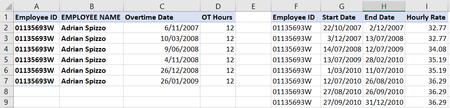
Based on initial screenshot that could be like
=LOOKUP(2, 1/ ( $G2:$G9 = A2 )/ (C2>=$H$2:$H$9)/ (C2<=$I$2:$I$9), $J$2:$J$9)For entire range, using dynamic one
=LOOKUP(2, 1/
 ( $G$2:INDEX($G:$G, COUNTA($G:$G)) = $A2 ) /
 ( $C2 >= $H$2:INDEX($H:$H, COUNTA($H:$H)) )/
 ( $C2 <= $I$2:INDEX($I:$I, COUNTA($I:$I)) ),
 $J$2:INDEX($J:$J, COUNTA($J:$J)))


I am removing my suggested solution because the suggested solution was only for the presented dataset and not for the 4000 lines of variant [Start Date] and [End Date] for 130 other employees. to get an accurate solution, the [Start Date] column and the [End Date] column must be in a separate table with unique start and end date ranges and must include all date ranges to compare against the 4000 OT dates. Maybe try SergeiBaklan solution.
As a variant, here is a sample file for what is being described above.
Where Periods table must have unique ranges
That way, if an employee has OT in the same period on a different day
or a different employee has OT on the same day as 129 other employees the comparison is not looking at multiple instances of the same period range that will skew the result the solution will still accurately detect it since the setup makes it that much granular and not lumpy
See attached
 markplumridgeSep 02, 2021Copper ContributorThanks Yea_So
I cant follow your suggestion. I am trying to lookup the hourly rate that the Overtime date falls between so I can use this to calculate a cost using the OT hrs.
Also my actual spreadsheet has over 4000 rows for approx. 130 employees with different range of salary dates so I am unsure how to use your method with this volume of dates.
Hope your can still help!- SergeiBaklanSep 02, 2021Diamond Contributor
Based on initial screenshot that could be like
=LOOKUP(2, 1/ ( $G2:$G9 = A2 )/ (C2>=$H$2:$H$9)/ (C2<=$I$2:$I$9), $J$2:$J$9)For entire range, using dynamic one
=LOOKUP(2, 1/ ( $G$2:INDEX($G:$G, COUNTA($G:$G)) = $A2 ) / ( $C2 >= $H$2:INDEX($H:$H, COUNTA($H:$H)) )/ ( $C2 <= $I$2:INDEX($I:$I, COUNTA($I:$I)) ), $J$2:INDEX($J:$J, COUNTA($J:$J)))- markplumridgeSep 02, 2021Copper ContributorThanks Sergei. That worked.