Forum Discussion

Select data within Multiple Rows within date ranges
- Sep 02, 2021
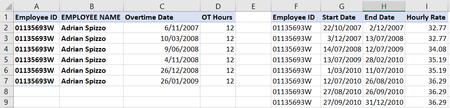
Based on initial screenshot that could be like
=LOOKUP(2, 1/ ( $G2:$G9 = A2 )/ (C2>=$H$2:$H$9)/ (C2<=$I$2:$I$9), $J$2:$J$9)For entire range, using dynamic one
=LOOKUP(2, 1/
 ( $G$2:INDEX($G:$G, COUNTA($G:$G)) = $A2 ) /
 ( $C2 >= $H$2:INDEX($H:$H, COUNTA($H:$H)) )/
 ( $C2 <= $I$2:INDEX($I:$I, COUNTA($I:$I)) ),
 $J$2:INDEX($J:$J, COUNTA($J:$J)))


mathetes Thank you. File is now attached.

Thank you for posting the spreadsheet. But at first it was more confusing than your original post. The workbook has a front sheet (Sheet1) that contains a few formulas (VLOOKUP and INDEX/MATCH) but they don't refer to the Sheet2, which is where the data you originally posted in image form. Nor is it readily apparent what criteria are being used.
So could you please spell out more clearly what it is you want done with the data on Sheet2 (or Sheet1).
That said, since you specified two criteria at the start, may I point you in the direction of a possible solution. If you have the newest version of Excel, there are some new "Dynamic Array functions," FILTER and UNIQUE among them, that might be the solution you're looking for. Here's a YouTube video that explains them....from the formulas you've written, it would appear that you do have a good grasp of some of the basics of data retrieval from an Excel database.....these new functions take that to a whole new level. https://www.youtube.com/watch?v=9I9DtFOVPIg
But you will need the newest version of Excel for these Dynamic Array functions to work
- markplumridgeSep 02, 2021Copper ContributorThanks mathetes. I will take a look and try but it might be beyond my skill set.
- mathetesSep 02, 2021Gold ContributorI'm willing to help more, but you need to give some clarification on exactly what it is you're trying to do,