Forum Discussion

Jstevens64
Dec 13, 2019Copper Contributor
searching groups of items and returning the one with the highest value in each group
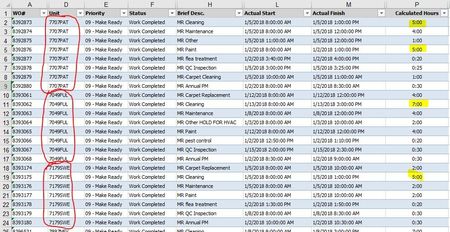
how do I search groups of work orders and return the work order number that took the longest to complete. The attached example shows 3 groups of work orders (each group is circled in red). The contr...
- Dec 13, 2019Insert a pivottable using this table as its source.
Drag Unit to the row area
Drag WO# to the row area
Drag Calculated Hours to the bottom-right area
Right-click the Unit column (anywhere within the column), choose Filter, Top 10 items.
In the dialog select top 1 and have it use the calculated hours as the item to do the top 1 on.

JKPieterse
Dec 13, 2019Silver Contributor
Insert a pivottable using this table as its source.
Drag Unit to the row area
Drag WO# to the row area
Drag Calculated Hours to the bottom-right area
Right-click the Unit column (anywhere within the column), choose Filter, Top 10 items.
In the dialog select top 1 and have it use the calculated hours as the item to do the top 1 on.
Drag Unit to the row area
Drag WO# to the row area
Drag Calculated Hours to the bottom-right area
Right-click the Unit column (anywhere within the column), choose Filter, Top 10 items.
In the dialog select top 1 and have it use the calculated hours as the item to do the top 1 on.
 Jstevens64Dec 13, 2019Copper ContributorJan! Perfect! That did the trick!