Forum Discussion

Goinsbunch Goins
Jul 13, 2018Copper Contributor
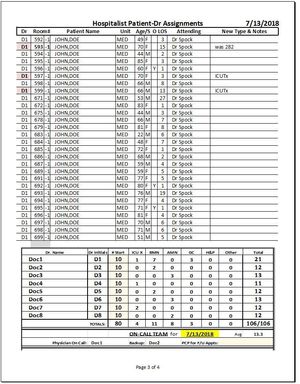
Print Camera Object on Whole Page, Without Bleed Over
I have a camera object that you can see in the Pre Print Image. I need this to be printed it's on page if the data above it pushes it to bleed over onto the next page. I've googled/se...

Man Fai Chan
Jul 14, 2018Iron Contributor
How about insert a page break in row 211 (just before the object) in the "page break preview"?
 Goinsbunch GoinsJul 14, 2018Copper ContributorThanks Man for responding.
Presently I am using a macro that prints the two worksheets needed, which always puts the data from the camera object into a new page. While this works perfect sometimes (a census between 109-131 or over 151 patients), anything in between wastes an entire page. Hence having to cut and tape the table to the bottom of the 3rd or 4th page in those scenarios.
I have toyed around with editing the macro to print the camera object when there is <108,131>151 patients and printing it as two separate worksheet otherwise. But the coding is too cumbersome for my novice abilities to translate from the sites I've read online.
For now it seems like scissors and tape... Any other ideas?- Man Fai ChanJul 14, 2018Iron Contributor
I prepared the following code:
Sub Move_Photo()
   n = Val(InputBox("Input number of rows in front of the photo"))

   Set RS = Sheets.Add

   For i = 1 To n
     RS.Cells(i, 1) = i

     j = i Mod 4 + 3

     RS.Cells(i, j) = "Data " & i
   Next i
 ' Inserting data rows
 ' Not useful in the program
 ' Just to show the user that there are n row in front of the inserted photo

 Sheets("Sheet1").Select
 Sheets("Sheet1").Shapes.Range(Array("Inserted Photo")).Select
 Selection.Copy

 RS.Select
 RS.HPageBreaks.Add before:=Cells(n + 1, 1)
 ' Inserting a horizontal page break
 RS.Range("A" & n + 1).Select
 RS.Paste
End Sub
You may download the file and import the code into it. Hope that it inspires you the way to insert horizontal pagebreak.
- Goinsbunch GoinsJul 14, 2018Copper ContributorWill give it a go here in the next few hours and tell you how it works! Thanks again!