Forum Discussion

Running Total Formula Changing on me
- Sep 14, 2023
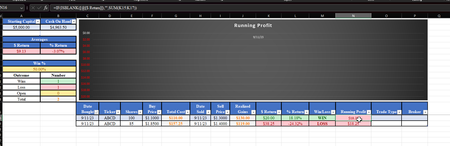
I have had that happen one other time, where somehow a correction to a formula in a table doesn't populate with the corrected formula to new rows; it's as if Excel remembers somewhere in the back of its inscrutable mind the original formula and keeps insisting on using it.
In the attached, although I didn't finish your conditional formatting (nor did I repair the graph), I totally deleted the original column N, then inserted a new one, and wrote the correct formula, which now does seem to propagate correctly. You obviously know how to complete the rest of the stuff.
Basic message, you may need to start with an altogether new spreadsheet.
By the way, I think it might be better to keep the transaction history in one sheet, the summary reporting in another. Mixing Input and Output on one sheet (especially as you've done it here, with summary on top of the transaction history) can cause the editing/revising of either one to mess up the other. People often talk of creating a "dashboard" sheet that presents the high level summary, and keeping it separate from (in the same workbook, but on a different tab) the raw data.
You might also consider--here I don't know your clients, the people you're creating this for--creating a simpler transaction history, where the buying of shares of ABC is one row (with date, ticker, quantity, price, total) as one row, and the sale of shares another row. This would be almost essential if your clients do a series of buys of ABC in, say, quantities of 500, then did sales in quantities of 100 after significant capital gains (or losses)..... Your design presumes buying and selling the same quantities (there's only one column for "Shares"); which could be a design flaw.


I have had that happen one other time, where somehow a correction to a formula in a table doesn't populate with the corrected formula to new rows; it's as if Excel remembers somewhere in the back of its inscrutable mind the original formula and keeps insisting on using it.
In the attached, although I didn't finish your conditional formatting (nor did I repair the graph), I totally deleted the original column N, then inserted a new one, and wrote the correct formula, which now does seem to propagate correctly. You obviously know how to complete the rest of the stuff.
Basic message, you may need to start with an altogether new spreadsheet.
By the way, I think it might be better to keep the transaction history in one sheet, the summary reporting in another. Mixing Input and Output on one sheet (especially as you've done it here, with summary on top of the transaction history) can cause the editing/revising of either one to mess up the other. People often talk of creating a "dashboard" sheet that presents the high level summary, and keeping it separate from (in the same workbook, but on a different tab) the raw data.
You might also consider--here I don't know your clients, the people you're creating this for--creating a simpler transaction history, where the buying of shares of ABC is one row (with date, ticker, quantity, price, total) as one row, and the sale of shares another row. This would be almost essential if your clients do a series of buys of ABC in, say, quantities of 500, then did sales in quantities of 100 after significant capital gains (or losses)..... Your design presumes buying and selling the same quantities (there's only one column for "Shares"); which could be a design flaw.
- Mendenj85Sep 14, 2023Copper Contributor
mathetes
I will try these ideas after work today. Appreciate the input. Most of the people who will use this buy and sell the same stock within the same day but I get the thought behind your suggestions and will definitely take them into consideration. Thanks again!