Forum Discussion

YlvaElise
Mar 17, 2023Copper Contributor
Run a macro
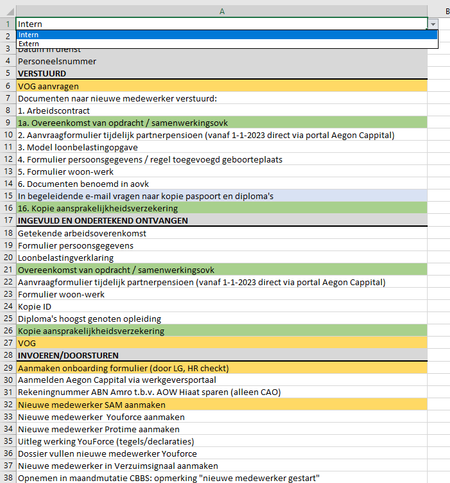
Hi all, I want to run a Macro. What I want it to do: When I select Intern, I want the file to show the yellow and blank columns, and when I select Extern, I want it to show the yellow and green c...

HansVogelaar
Mar 17, 2023MVP
It would be much easier if you added a column that contains a code (for example a single letter) corresponding to whether the row is for Intern or Extern only.
With the current setup:
Right-click the sheet tab.
Select 'View Code' from the context menu.
Copy the following code into the worksheet module:
Private Sub Worksheet_Change(ByVal Target As Range)
    Dim rng As Range
    Dim cel As Range
    If Not Intersect(Range("A1"), Target) Is Nothing Then
        Application.ScreenUpdating = False
        Application.EnableEvents = False
        Range("A2:A1000").EntireRow.Hidden = False
        Select Case Range("A1").Value
            Case "Intern"
                For Each cel In Intersect(Range("A2:A1000"), Me.UsedRange)
                    If cel.Interior.Color = RGB(168, 208, 141) Then
                        If rng Is Nothing Then
                            Set rng = cel
                        Else
                            Set rng = Union(cel, rng)
                        End If
                    End If
                Next cel
            Case "Extern"
                For Each cel In Intersect(Range("A2:A1000"), Me.UsedRange)
                    If cel.Interior.ColorIndex = xlColorIndexNone Then
                        If rng Is Nothing Then
                            Set rng = cel
                        Else
                            Set rng = Union(cel, rng)
                        End If
                    End If
                Next cel
        End Select
        If Not rng Is Nothing Then
            rng.EntireRow.Hidden = True
        End If
        Application.EnableEvents = True
        Application.ScreenUpdating = True
    End If
End Sub
You may have to adjust the value RGB(168, 208, 141) to the precise color green that you used.
The code will run automatically when you select Intern or Extern in A1.