Forum Discussion

Laura_1993
May 31, 2022Copper Contributor
Returning value in new sheet based on multiple criteria
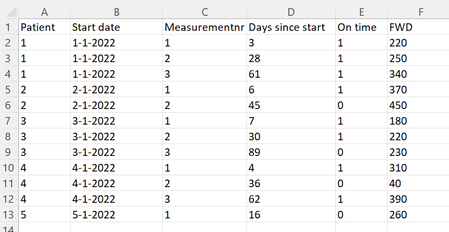
Hello! I am trying to rearrange my Excel dataset (+/- 5000 patients). I'm hoping someone can help me with the following. As an example, currently the dataset is arranged like this on Sheet 1:...
 May 31, 2022
=IFERROR(INDEX($F$2:$F$13,MATCH(1,($A$2:$A$13=$H2)*($C$2:$C$13=I$1)*($E$2:$E$13=1),0)),"-")Maybe with this formula. Enter the formula with ctrl+shift+enter if you don't work with Office365 or 2021.
OliverScheurich
May 31, 2022Gold Contributor
=IFERROR(INDEX($F$2:$F$13,MATCH(1,($A$2:$A$13=$H2)*($C$2:$C$13=I$1)*($E$2:$E$13=1),0)),"-")Maybe with this formula. Enter the formula with ctrl+shift+enter if you don't work with Office365 or 2021.

Laura_1993
Jun 01, 2022Copper Contributor
This works! Thank you very much!